Kategoriler
-
Genel (79)WOLVOX (459)e-Dönüşüm (77)e-Ticaret (473)Bulut Yazılımları (135)Sektörel Programlar (61)Tasarım & Raporlama (1)Veritabanı & SQL (21)Donanım Entegrasyonları (55)İnsan Kaynakları & PDKS (19)Kurulum, Lisans & Bakım (31)Geliştirici (1)Yardım Dokümanları (15)Sürüm Notları (56)English Documentation (240) • WOLVOX ERP (132) • Barcode Sales (20) • E-Commerce (15) • Restaurant (15) • General Information (14) • CafePlus (11) • TaskPano (9) • MSSQL Server (6) • QR Menu (5) • End-Year Transactions (3) • Hardware Integrations (3) • WebConnect (2) • Hotel (2) • Control Panel (1) • Mobile Sales (1) • Sectoral Programs (1)
Unprocessed Stocks Report
You may want to see which products did not get process in time interval defined by you. To see these products, follow the steps in below;
Stok Management->Reports->Analyses->Unprocessed Stocks
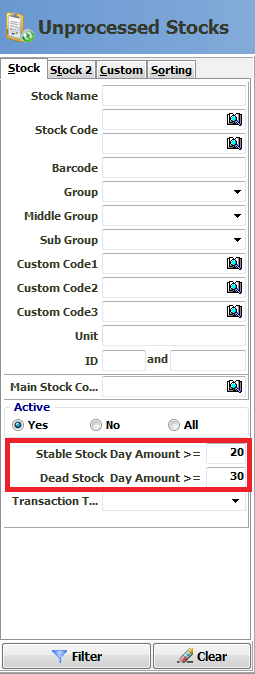
As you can see, in filter field of report there are some parameters as usual like other reports. There are 2 specific parameters for this report. You may define time interval as you like and filter.
Stable Stock Day Amount --> All stock you have that are unprocessed, unsold or unproduced in certain time.
Dead Stock Day Amount --> All stock you have that are unrequested or not consumed in certain time.
Kaynak: AKINSOFT Bilgi Bankası (KOD A3141) · güncellenme 26.03.2025
