Kategoriler
-
Genel (79)WOLVOX (459)e-Dönüşüm (77)e-Ticaret (473)Bulut Yazılımları (135)Sektörel Programlar (61)Tasarım & Raporlama (1)Veritabanı & SQL (21)Donanım Entegrasyonları (55)İnsan Kaynakları & PDKS (19)Kurulum, Lisans & Bakım (31)Geliştirici (1)Yardım Dokümanları (15)Sürüm Notları (56)English Documentation (240) • WOLVOX ERP (132) • Barcode Sales (20) • E-Commerce (15) • Restaurant (15) • General Information (14) • CafePlus (11) • TaskPano (9) • MSSQL Server (6) • QR Menu (5) • End-Year Transactions (3) • Hardware Integrations (3) • WebConnect (2) • Hotel (2) • Control Panel (1) • Mobile Sales (1) • Sectoral Programs (1)
Select Show "Unit Selection" Screen In Adding Stock Process
If you have more than 1 unit in stock, you need to use unit selection option.
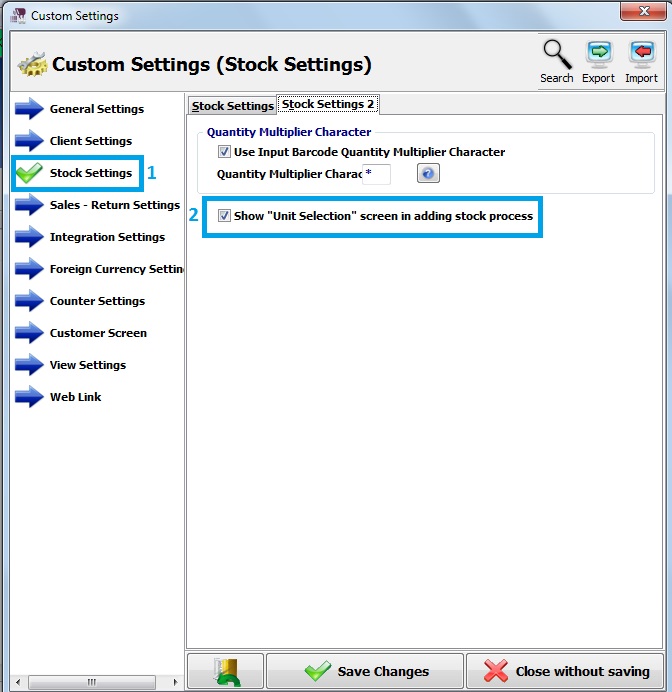
Firstly, click on Admin – Custom Definitions – Custom Settings.
Secondly, click on Stock Settings – Stock Settings 2.
Moreover, select show "unit selection" screen in adding stock process.
Save changes.
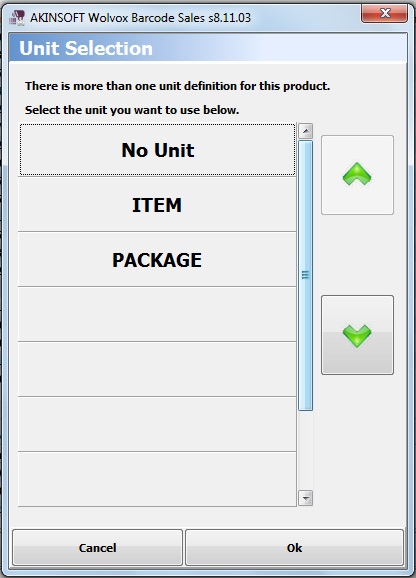
When you select the stock that has more than one units program shows you unit selection page.
Kaynak: AKINSOFT Bilgi Bankası (KOD A3235) · güncellenme 28.03.2025
