Kategoriler
-
Genel (79)WOLVOX (459)e-Dönüşüm (77)e-Ticaret (473)Bulut Yazılımları (135)Sektörel Programlar (61)Tasarım & Raporlama (1)Veritabanı & SQL (21)Donanım Entegrasyonları (55)İnsan Kaynakları & PDKS (19)Kurulum, Lisans & Bakım (31)Geliştirici (1)Yardım Dokümanları (15)Sürüm Notları (56)English Documentation (240) • WOLVOX ERP (132) • Barcode Sales (20) • E-Commerce (15) • Restaurant (15) • General Information (14) • CafePlus (11) • TaskPano (9) • MSSQL Server (6) • QR Menu (5) • End-Year Transactions (3) • Hardware Integrations (3) • WebConnect (2) • Hotel (2) • Control Panel (1) • Mobile Sales (1) • Sectoral Programs (1)
There is no Block/Deadline option in Received or Given Order form
If stock block/deadline option is not visible at received or given order form in Wolvox ERP, situations needed to be checked are as below.
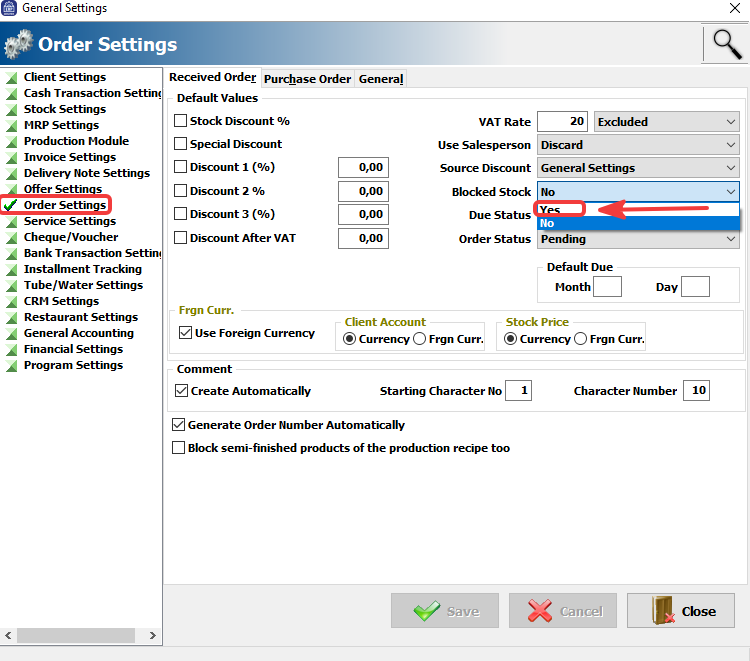
1) Admin -> Definitions -> General Settings -> Order Settings -> Stock block/deadline option should be active at received/given order menu.
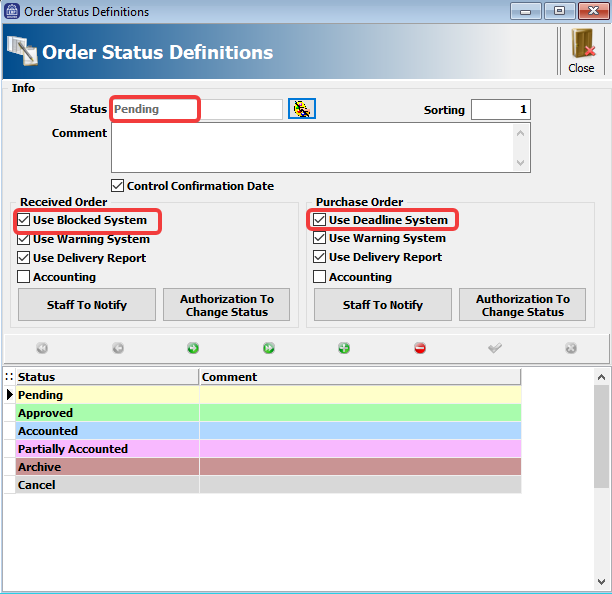
2) "Use Stock Block/Deadline system" option must be checked at Order Status Definition area.
Kaynak: AKINSOFT Bilgi Bankası (KOD A2859) · güncellenme 11.08.2026
